Copy & Paste
Math Symbols to Copy and Paste ± × ÷ √ ∞
Math symbols express operations and relationships compactly. Copy common signs such as ±, ×, ÷, √, and ∞, then check the meaning and exact character before putting them into an equation.
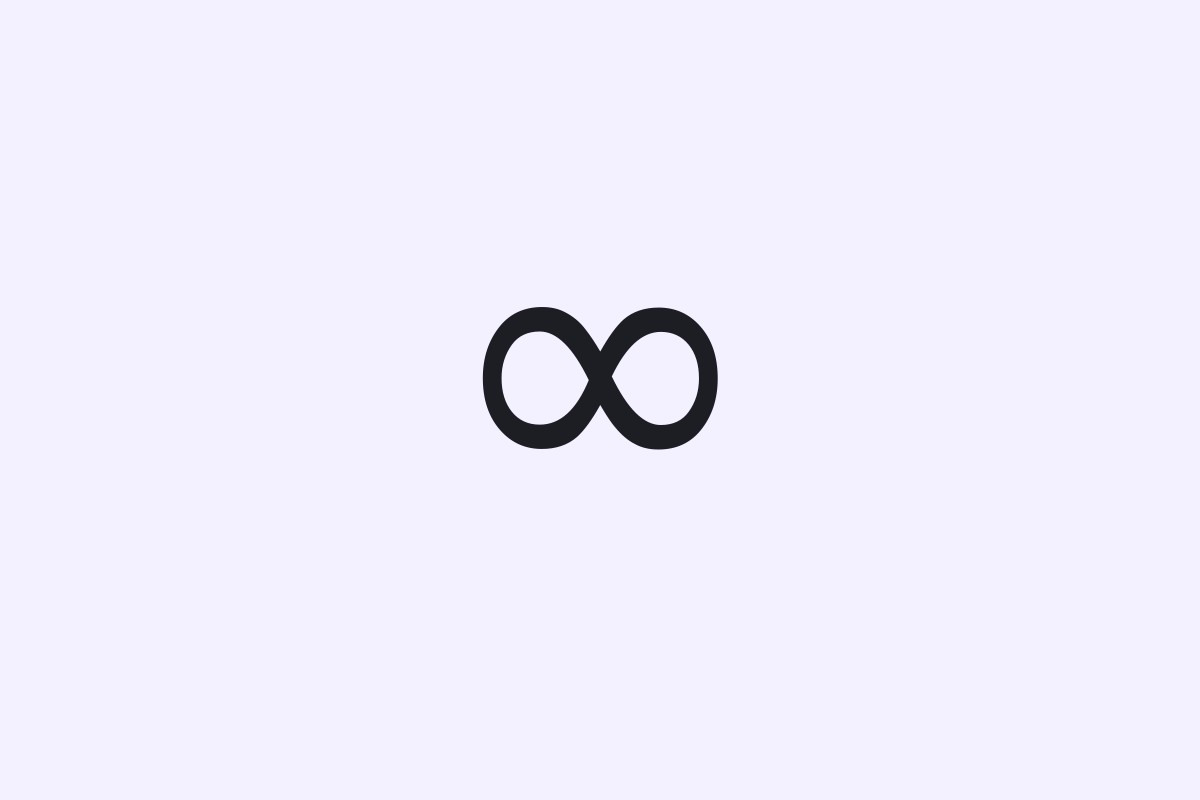
Choose a symbol to copy
Quick input reference
| Windows | No universal legacy Windows Alt code is recommended for this set. Use Character Map, select the exact character, copy it, and paste it into your document. |
|---|---|
| Word for Windows | In Word for Windows, type 221E, select only those hexadecimal digits, and press Alt+X to obtain ∞. This is a Word Unicode conversion, not a system-wide Windows shortcut. The same method works with each tile’s U+ value after removing U+. |
| Mac | Choose Edit > Emoji & Symbols and search the symbol name, such as “infinity,” “square root,” or “not equal.” |
| iPhone / Android | Copy the symbol here and paste it on iPhone or Android. Mobile keyboards expose only part of the mathematical repertoire; use an equation editor for fractions, matrices, and multi-level expressions. |
| HTML | For ∞, use ∞ or ∞ in HTML source. Numeric decimal references for every tile are listed below. |
Math symbols express operations and relationships compactly. Copy common signs such as ±, ×, ÷, √, and ∞, then check the meaning and exact character before putting them into an equation.
Common math symbols and their meanings
± means plus or minus, × multiplication, and ÷ division in common elementary notation. − is the mathematical minus sign U+2212, distinct from the keyboard hyphen-minus. ≠ means not equal; ≈ commonly means approximately equal; ≤ and ≥ mean less than or equal to and greater than or equal to.
√ introduces a square root, ∞ represents infinity, ∑ indicates summation, and ∏ indicates a product in common mathematical notation. ∫ is the integral sign, ∂ is the partial differential sign, and ∇ is the nabla operator. The precise operation depends on the surrounding expression and the course’s definitions.
For sets, ∈ means is an element of, ∉ means is not an element of, ∅ is the empty set, ∪ is union, and ∩ is intersection. In logic, ∀ means “for all” and ∃ means “there exists.” These brief labels help identify the symbols but do not replace a lesson in how to use them.
Similar-looking characters are not always equivalent
A lowercase x is a letter; × is the multiplication sign. The empty-set sign ∅ is not the digit zero or the slashed letter Ø. ∑ is a mathematical summation operator, while Σ is the capital Greek letter sigma. They have related visual forms but different Unicode identities.
∆ is U+2206 INCREMENT, while Δ is the Greek capital delta. In some notation the distinction is not visible, but exact character choice matters for searching, accessibility, and software processing. Use the Greek alphabet tool when you need a letter rather than a mathematical operator.
When to use an equation editor instead
Unicode supplies many individual mathematical characters, reflecting a long tradition of specialized notation. It does not make a string of plain text equivalent to a structured equation. A root over a long expression, a stacked fraction, or an integral with limits is usually better entered in an equation editor or MathML-capable system.
Use plain symbols for short expressions and labels. For longer material, preserve grouping, define variables, and provide accessible mathematical structure. Copying a handsome symbol cannot repair an ambiguous equation. Unicode’s mathematics report is useful for character distinctions and layout considerations rather than a list of universal keyboard shortcuts.
Mathematical notation has a history
MacTutor dates Robert Recorde’s printed use of the equals sign to The Whetstone of Witte (1557). His form was more elongated than today’s familiar =. Symbols became conventions through use and publication; they were not handed down as one unchanging, universal system.
How to type these symbols
Windows
No universal legacy Windows Alt code is recommended for this set. Use Character Map, select the exact character, copy it, and paste it into your document.
Microsoft Word for Windows
In Word for Windows, type 221E, select only those hexadecimal digits, and press Alt+X to obtain ∞. This is a Word Unicode conversion, not a system-wide Windows shortcut. The same method works with each tile’s U+ value after removing U+.
Mac
Choose Edit > Emoji & Symbols and search the symbol name, such as “infinity,” “square root,” or “not equal.”
iPhone and Android
Copy the symbol here and paste it on iPhone or Android. Mobile keyboards expose only part of the mathematical repertoire; use an equation editor for fractions, matrices, and multi-level expressions.
On Mac, the exact shortcut depends on the input source. Edit > Emoji & Symbols is the layout-independent starting point; Keyboard Viewer shows modifier-key characters for your active layout. On a phone, touch and hold the destination text field and choose Paste after copying.
Unicode and HTML codes
For ∞, use ∞ or ∞ in HTML source. Numeric decimal references for every tile are listed below. In ordinary messages, paste the visible character, not its entity text. Use UTF-8 for your webpage.
| Symbol | Unicode name | Code point | HTML decimal |
|---|---|---|---|
| ± | PLUS-MINUS SIGN | U+00B1 | ± |
| × | MULTIPLICATION SIGN | U+00D7 | × |
| ÷ | DIVISION SIGN | U+00F7 | ÷ |
| − | MINUS SIGN | U+2212 | − |
| ≠ | NOT EQUAL TO | U+2260 | ≠ |
| ≈ | ALMOST EQUAL TO | U+2248 | ≈ |
| ≤ | LESS-THAN OR EQUAL TO | U+2264 | ≤ |
| ≥ | GREATER-THAN OR EQUAL TO | U+2265 | ≥ |
| ∞ | INFINITY | U+221E | ∞ |
| √ | SQUARE ROOT | U+221A | √ |
| ∑ | N-ARY SUMMATION | U+2211 | ∑ |
| ∏ | N-ARY PRODUCT | U+220F | ∏ |
| ∫ | INTEGRAL | U+222B | ∫ |
| ∂ | PARTIAL DIFFERENTIAL | U+2202 | ∂ |
| ∆ | INCREMENT | U+2206 | ∆ |
| ∇ | NABLA | U+2207 | ∇ |
| ∈ | ELEMENT OF | U+2208 | ∈ |
| ∉ | NOT AN ELEMENT OF | U+2209 | ∉ |
| ∅ | EMPTY SET | U+2205 | ∅ |
| ∪ | UNION | U+222A | ∪ |
| ∩ | INTERSECTION | U+2229 | ∩ |
| ∀ | FOR ALL | U+2200 | ∀ |
| ∃ | THERE EXISTS | U+2203 | ∃ |
| ∴ | THEREFORE | U+2234 | ∴ |
| π | GREEK SMALL LETTER PI | U+03C0 | π |
| = | EQUALS SIGN | U+003D | = |
Find more characters in the Symbol Finder, compare math symbols, or explore how symbols gain meaning.
Frequently asked questions
Is − the same as a hyphen?
No. − is U+2212 MINUS SIGN; the ordinary keyboard - is U+002D HYPHEN-MINUS.
Can I type Unicode decimal numbers with Alt?
Not as a universal method. In Word for Windows, use the hexadecimal code followed by Alt+X; otherwise use Character Map or copy and paste.
What is the Unicode code point for ∞?
∞ is U+221E INFINITY. Its decimal HTML reference is ∞. A code point identifies the character, not a fixed font drawing.
Sources & further reading
- Unicode character names and annotations
- Microsoft: Insert ASCII or Unicode character codes in Word
- Microsoft: Windows keyboard tips and tricks
- Apple: Use emoji and symbols on Mac
- Apple: Use the Keyboard Viewer on Mac
- Apple: Type with the onscreen keyboard on iPhone
- Google: Use your keyboard on Android
- HTML Living Standard: Named character references
- Unicode Technical Report 25: Unicode support for mathematics
- University of St Andrews, MacTutor: Earliest uses of relation symbols